API Overview
Welcome to Blocks Cloud API docs. For your Blocks project, there are certain variables that are always used. Familiarize yourself with these variables, their usages are documented in the individual APIs where they are used.
It is worth consdering adding enviornment variables to your front-end applications so that you can use these values throughout the application.
Variables to Consider
Naming of these may vary based on your front-end stack. eg: for Vite React, your enviornment variables would be VITE_BLOCKS_API_URL for BLOCKS_API_URL and so on.
| Environment Variable | Description | Example |
|---|---|---|
BLOCKS_API_URL | Blocks Backend API base URL for using Blocks services (identity, AI, localization etc) | https://api.seliseblocks.com or https://blocksapi.yourdomain.com (for custom domain front-end implementations) |
X_BLOCKS_KEY | Project API key for identification | D370*********************9f34 |
PROJECT_SLUG | Another identifier for project, useful for certain APIs | dw***t |
CAPTCHA_SITE_KEY | CAPTCHA site key (optional) | 6Lc_7lYsAAAAAKh... |
CAPTCHA_TYPE | CAPTCHA type: reCaptcha or hCaptcha (optional) | reCaptcha |
Get the X-Blocks-Key
You can get the X-Blocks-Key by going to the Environment Overview Page. Hover to the right of the key to reveal a copy button. This key is specific to your project. If you want to access data for another project, you would have to use the key that belongs to that project.
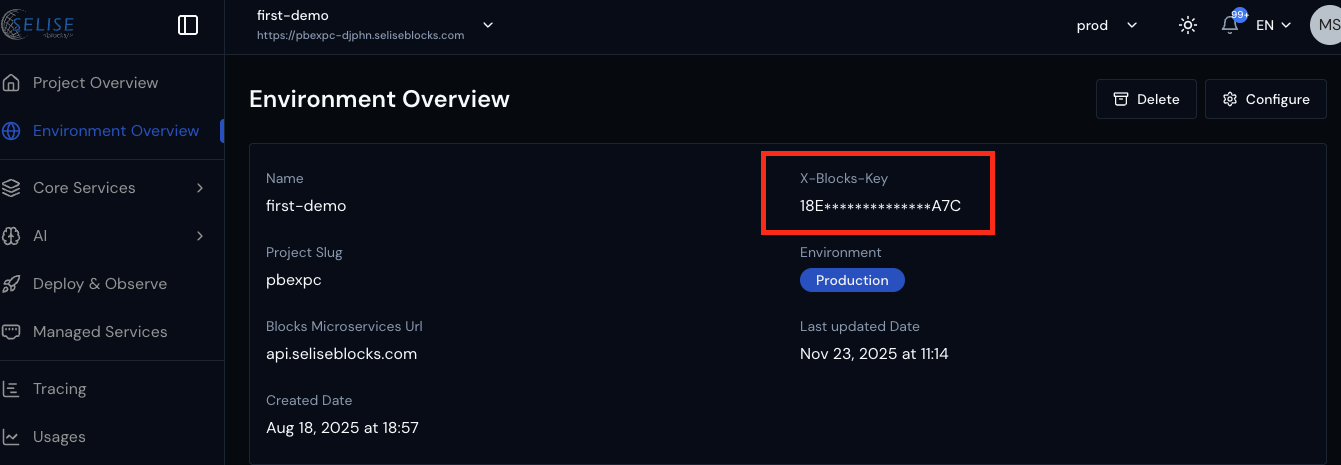
Once you have your api key pass it as a header value.
Some endpoints require a project key. You can use the X-Blocks-Key as the project key.
Access Tokens
With the exception of a few public APIs, most APIs from Blocks Cloud require an access token. Refer to the Authentication Section of the API Refence to see the different ways to get an access token.